Sealed-bid tenders
Sealed-bid tenders for societies and offices
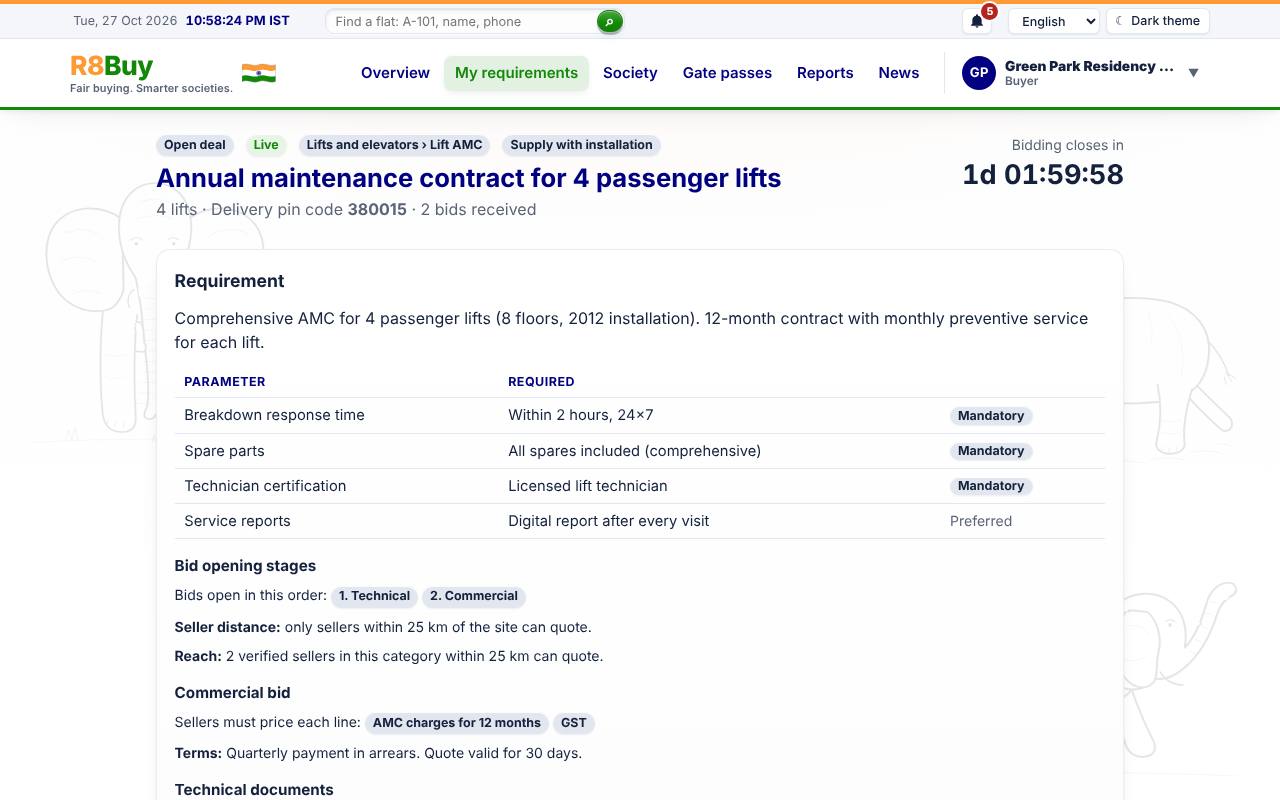
Post what you need, let verified sellers quote sealed, and award on merit. Nobody sees a name or a price until the timer ends, so there are no favourites and no last-minute deals.
Why it matters
Most society purchases are decided by a few people on a phone call: one vendor is "known to the secretary", another quote arrives after everyone has seen the first one, and the committee is left explaining the choice at the annual general meeting. Residents pay for that with higher maintenance and endless WhatsApp arguments.
A sealed-bid tender fixes the process rather than the people. Every verified seller in the category sees the same requirement, quotes once before the same deadline, and cannot see anyone else's price. The committee judges the technical offers without knowing who made them, and only then do prices open. The lowest qualified offer wins, and the full record is there for the auditor.
How it works
- Write the requirement: what you need, quantity, mandatory and preferred specifications, site address, budget ceiling and how long bidding stays open.
- Choose who may quote: open to all verified sellers in the category, only those within 10 or 25 km, or an invited list. You can also ask for a site visit or an earnest money deposit.
- Sellers quote sealed. They answer each specification, give a price (with a line-item breakup if you asked for one) and may lower their own price before the deadline.
- When the timer ends, judge each offer on the specifications, marked "Vendor A", "Vendor B" and so on. Reject an offer with a reason if it does not meet a mandatory point.
- Prices of qualified offers open. Award the lowest qualified offer; a second approver (for example the treasurer) confirms it.
- Download the purchase order and the tender report for the committee file and the audit.
What you get
- Post a requirement with specifications, quantity, a budget ceiling and a countdown
- Only sellers verified in that category, and within the distance you choose, can quote
- Sellers do not know who the buyer is; the buyer sees "Vendor A, B, C", not names
- Judge the technical offers first; prices open only for qualified bids, after the timer
- Award with a second approver, then download the purchase order and the full report for the committee and the auditor
- Single-vendor quotes, site visits, EMD and line-item price breakup when you need them
Who uses it in the society
- Secretary or manager
- writes the requirement and follows the bids
- Treasurer
- acts as second approver for the award
- Committee
- reads the tender report before the meeting
- Sellers
- see requirements in their verified categories and quote without knowing the buyer
Tips from societies using it
- Put the things you cannot compromise on as "mandatory" specifications; everything else as "preferred". It makes the technical judgement quick and fair.
- Set a budget ceiling: offers above it are refused automatically.
- For annual contracts such as lift or pump AMC, post the requirement two months before the old contract ends, so there is time for site visits.
- Use "repeat" on last year's requirement to post the same tender again in a minute.
Questions
Can the committee see who quoted?
Seller names stay hidden while bids are judged; the buyer sees them only after awarding, so the decision is on merit and on record.
What does it cost a seller?
Sellers pay a small number of bid credits per bid, shown on the pricing page. Buyers post requirements free.
Can we still buy from a vendor we already trust?
Yes. Use a single-vendor quote: the vendor quotes on R8Buy, and the acceptance needs the second approver, so it is still on record.
Is R8Buy a party to the contract?
No. The contract is between the society and the seller. R8Buy runs the process and keeps the record.
Try R8Buy free
Register your society, office or business. Every account is checked and approved, and new societies get a 24-hour demo with sample data.
More of R8Buy
- Gate passes and visitor management
- Maintenance bills and collection by UPI
- Residents directory and flat records
- Parking slots, vehicles and wrong parking
- Domestic staff and security guards
- Amenity booking and clubhouse
- Collections, bills, purchases and payroll
- Complaints, daily tasks and AMC contracts
- News, alerts and notifications