Gate passes and visitors
Gate passes and visitor management
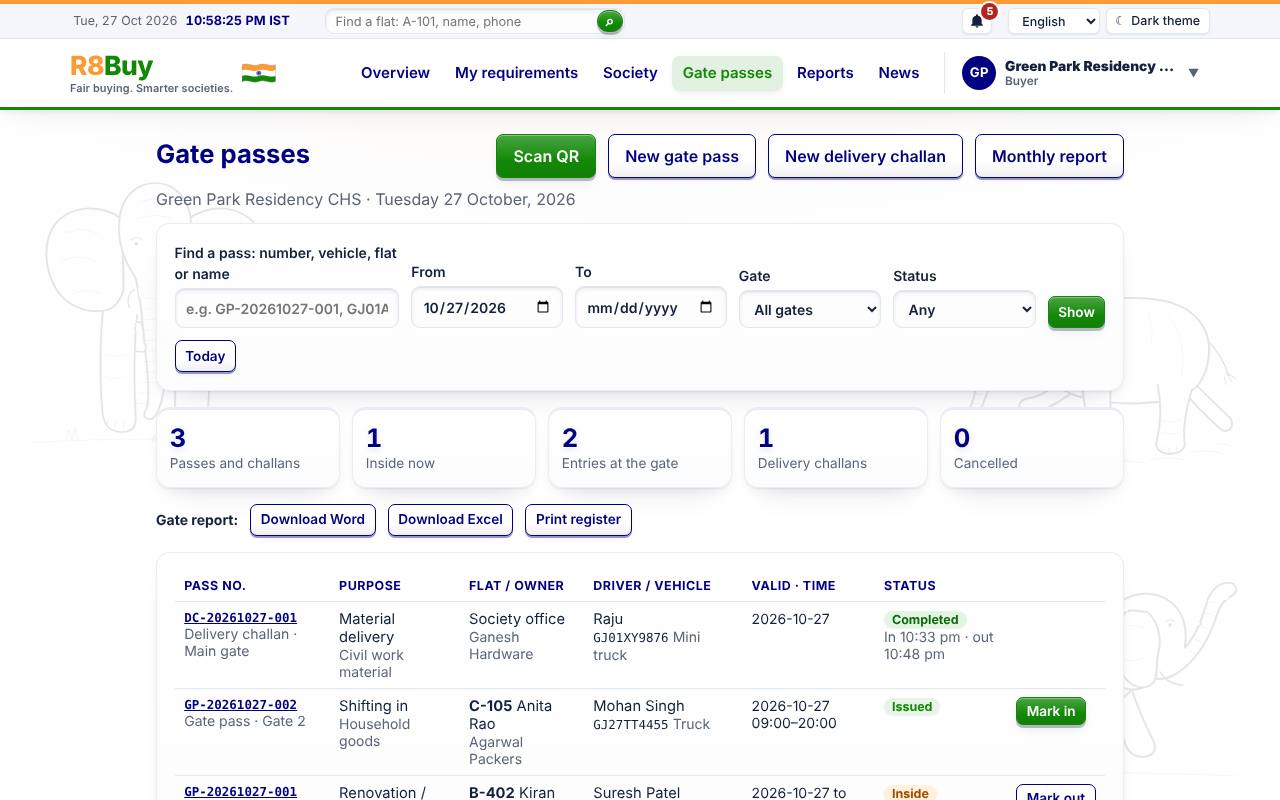
Issue a gate pass in seconds, send its QR code on WhatsApp, and let the guard scan it at the gate. Every entry and exit is recorded with the time and the guard's name.
Why it matters
The gate is where a society is most exposed. Furniture leaves on a tempo with nobody sure whether the owner allowed it, a "plumber" walks in without anyone having called him, and the visitor register is a notebook nobody can search.
With R8Buy every material movement and planned visit has a pass. The pass has a QR code the guard scans on his phone; it shows who approved it, for which flat, which vehicle, and for which days. Every scan is logged, so the committee can answer "who brought what in, and when" in seconds.
How it works
- The office or a committee member creates a gate pass or delivery challan: purpose, flat, items, vehicle and driver, valid dates and gate.
- Share the pass link on WhatsApp with the driver, contractor or visitor.
- At the gate, the guard scans the QR code, checks the details and marks the entry; later he marks the exit.
- Domestic staff show their own ID card with QR at the staff entry desk.
- At month end, download the gate register as Word or Excel for the committee.
What you get
- Gate passes and material delivery challans with a QR code
- One-time and multi-day passes, shifting in and out, renovation and service visits
- Guards get their own sign-in with security access only: scan, mark in and out, report problems
- Domestic staff ID cards with QR, checked at the staff entry desk
- Access control for doors, parking gates and cards: who may enter where and when
- Monthly gate register in Word and Excel for the committee
Setting it up
Name your gates (Main gate, Gate 2, Service gate) and add a security sub-user for each shift, so guards sign in with their own name and see only gate screens. Add the society's regular delivery vendors and contractors once, so passes fill in quickly. Print a small notice for residents explaining that shifting and renovation now need a pass from the office. The first week, check the gate report daily; most societies find that the guards prefer scanning to writing in the register.
Who uses it in the society
- Security guard
- scans passes and marks in and out, with his own sign-in that sees only the gate
- Society office
- issues passes and challans
- Committee
- reads the monthly gate report
- Residents
- receive a pass link for their shifting or renovation work
Tips from societies using it
- Make shifting-out passes require the office: it prevents a tenant leaving with dues pending.
- Use one-time passes for deliveries and multi-day passes for renovation work.
- Give each gate its own name, so the report shows which gate was used.
- Pair gate passes with access control to record which door a card may open.
Questions
Does the guard need a special device?
No. Any Android or iPhone with a browser works; the phone camera scans the QR code.
Can residents create passes themselves?
The society office, committee members and staff create passes; each pass has a link that can be shared with the visitor or driver.
What if the internet is slow at the gate?
The pass page is light and opens on a basic 4G phone; the guard can also search the pass by number.
Can a guard cancel a pass?
No. Guards can mark entries and report problems; cancelling is for the office.
Can a pass be valid for several days?
Yes. Set the start and end dates; the guard can mark entries on each day.
Try R8Buy free
Register your society, office or business. Every account is checked and approved, and new societies get a 24-hour demo with sample data.
More of R8Buy
- Sealed-bid tenders for societies and offices
- Maintenance bills and collection by UPI
- Residents directory and flat records
- Parking slots, vehicles and wrong parking
- Domestic staff and security guards
- Amenity booking and clubhouse
- Collections, bills, purchases and payroll
- Complaints, daily tasks and AMC contracts
- News, alerts and notifications