Residents directory
Residents directory and flat records
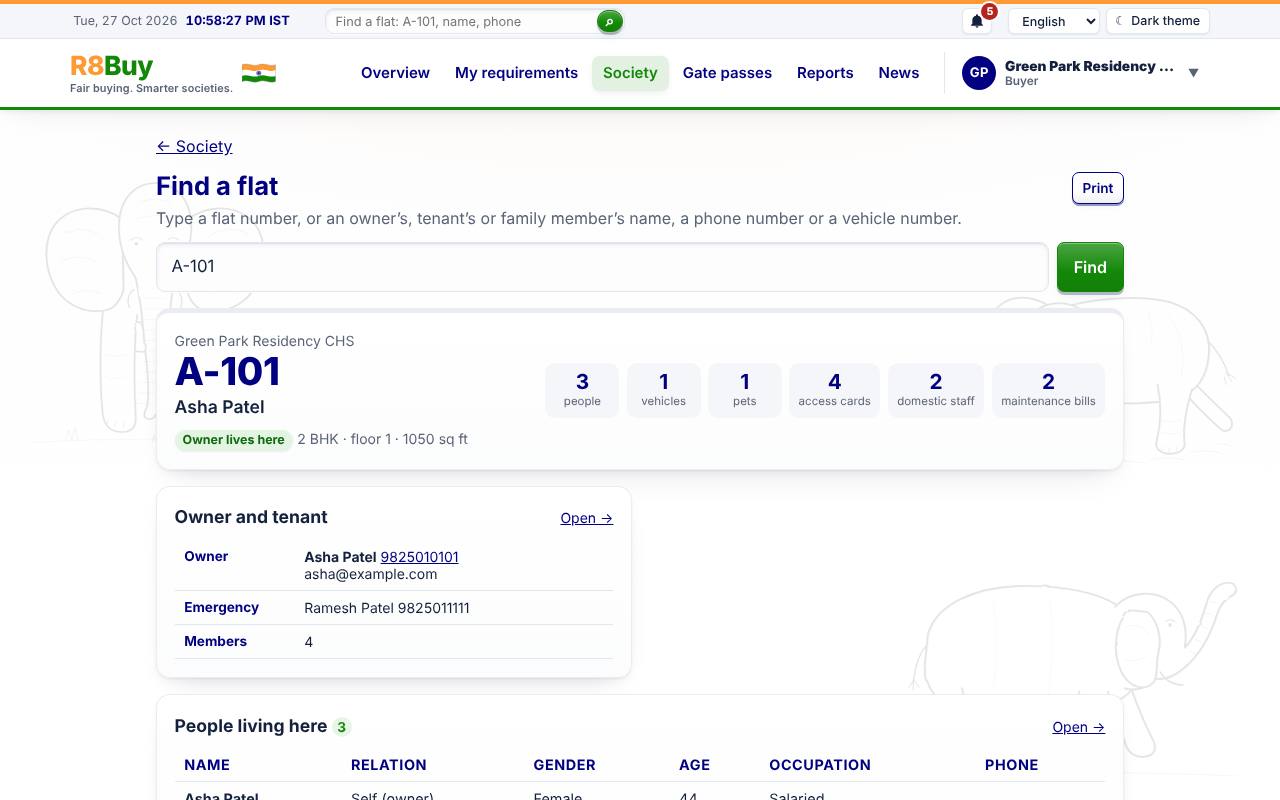
Keep one register of every flat: owner and tenant, people living there by age group, vehicles, pets, access cards and staff. Type a flat number, name, phone or vehicle number to see it all on one page.
Why it matters
Most societies have their member list in three places: an Excel sheet with the treasurer, a register in the office, and the security guard's notebook. Tenants change, phone numbers go out of date, and nobody knows who actually lives in B-402 today.
R8Buy keeps one register for the whole society, and every other module reads from it. Type a flat number into a gate pass, a parking record or a maintenance bill, and the owner's or tenant's name and phone fill in by themselves.
How it works
- Upload your existing Excel sheet with the R8Buy template, or add flats one by one.
- Share a self-registration link; owners and tenants fill in their family, vehicles and pets, and the office approves each entry.
- Type a flat number, name, phone or vehicle number in "Find a flat" to see everything about that flat on one page.
- Keep it current: when a tenant moves out, mark it, and their passes and parking follow.
What you get
- Owners, tenants and family members, with occupation and emergency contact
- Upload from Excel, or share a self-registration link that residents fill in for you to approve
- People by age group and gender for events and census
- Vehicles, parking slots and stickers, pets with vaccination reminders
- Fill in other forms by just typing the flat number: names and phones come in automatically
- Encrypted backup and restore of all records
Setting it up
Download the Excel template from Residents, copy your existing columns into it (flat, owner, phone, email, tenant, occupancy) and upload it. R8Buy tells you which rows were added, which were updated and which it skipped, with the reason, so you can fix them and upload again. Then create a self-registration link and share it in the residents' WhatsApp group: each family adds its members, vehicles and pets, and you approve the entries one by one. Within a week most societies have a complete, current register for the first time.
Who uses it in the society
- Society office
- keeps the register up to date
- Committee
- plans events by age group and checks occupancy
- Security
- looks up a flat at the gate, without seeing email addresses
- Residents
- register themselves through a link
Tips from societies using it
- Start with the Excel upload; most societies are fully set up in an afternoon.
- Ask residents to self-register before the AGM; it is the easiest moment to collect details.
- Record emergency contacts for senior citizens living alone.
- Take an encrypted backup after the first upload.
Questions
Who can see residents' phone numbers?
Only the society account and the sub-users it allows. Security guards see what they need at the gate, without email addresses.
Can residents update their own details?
Yes, through a self-registration link; the office approves each change before it is saved.
Is residents' data shared with anyone?
No. It belongs to the society account. R8Buy does not sell or share it.
Can we export everything?
Yes, as Excel, and as an encrypted backup that can be restored.
What about flats that are vacant or locked?
Mark the occupancy as vacant; the flat stays in the list for maintenance bills and parking, without residents.
Can a committee member see the register on their phone?
Yes. Give them a sub-user sign-in; the register works on any phone browser.
Try R8Buy free
Register your society, office or business. Every account is checked and approved, and new societies get a 24-hour demo with sample data.
More of R8Buy
- Sealed-bid tenders for societies and offices
- Gate passes and visitor management
- Maintenance bills and collection by UPI
- Parking slots, vehicles and wrong parking
- Domestic staff and security guards
- Amenity booking and clubhouse
- Collections, bills, purchases and payroll
- Complaints, daily tasks and AMC contracts
- News, alerts and notifications