Maintenance collection with UPI
Maintenance bills and collection by UPI
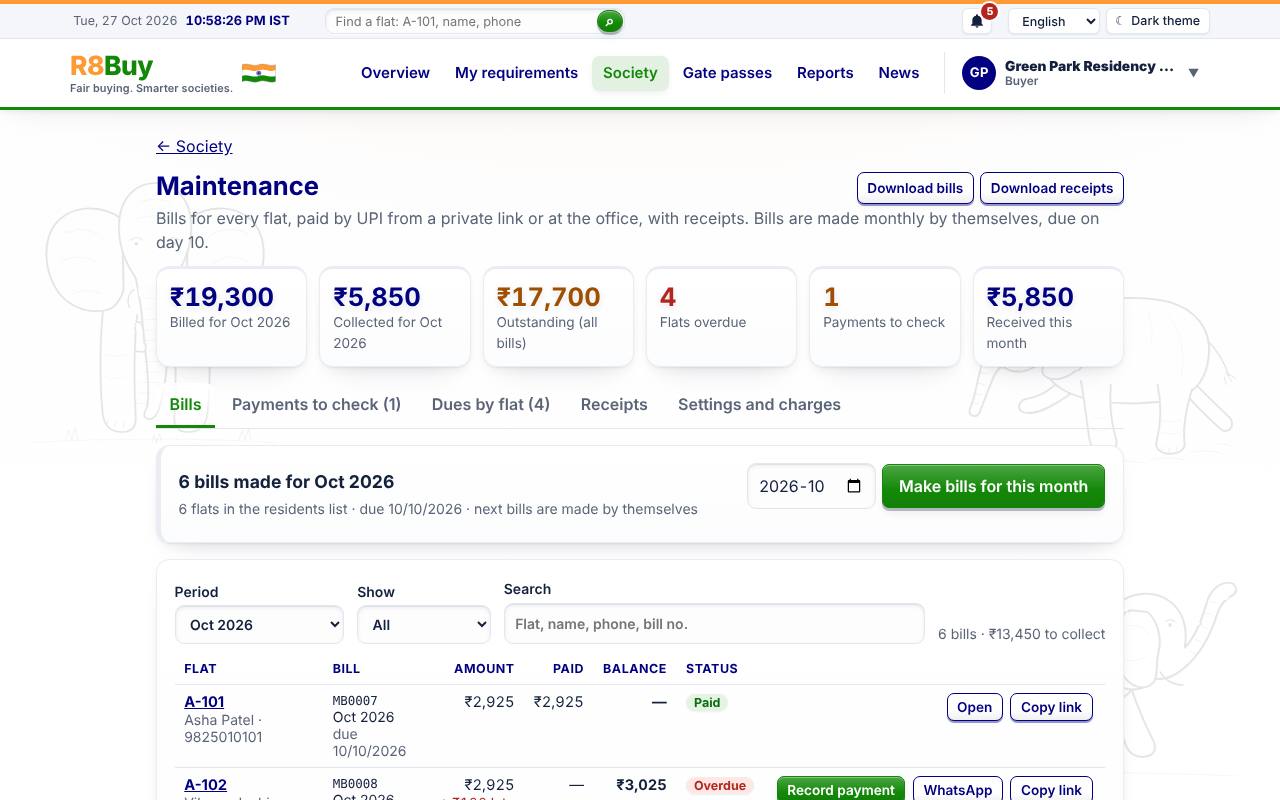
R8Buy makes the maintenance bill for every flat each month, sends each flat its own link, and lets residents pay by UPI. The treasurer confirms the payment and the receipt is issued at once.
Why it matters
Collecting maintenance is the most time-consuming job of a society treasurer: making bills in Excel, sending them one by one, checking bank statements against flat numbers, chasing the same twelve flats every month and writing receipts by hand.
R8Buy does the routine work. Bills are made for every flat automatically on the day you choose, each flat gets its own link, and residents pay the society's UPI ID straight from that page. The treasurer only confirms payments; receipts are numbered and issued at once, and the dues list is always up to date.
How it works
- Set the charges once: maintenance per flat or per square foot, sinking fund, repair fund, parking, water or any other head, and how often each is billed.
- Choose the due day and late fees: a fixed amount or a percentage, after a grace period.
- R8Buy makes the bills for every flat in the residents directory each period.
- Send each flat its bill link on WhatsApp; the resident sees the bill and pays by any UPI app.
- The resident enters the UPI reference; the treasurer checks it and confirms. Cash and cheque payments are recorded at the office.
- Download bills, receipts and the dues list for the accounts.
What you get
- Charges per flat, per square foot or fixed, monthly, quarterly or yearly
- Late fees as a fixed amount or a percentage, after the due date you choose
- Each flat gets a private link to see its bill and pay by any UPI app
- Payments to check, receipts in a series, cash and cheque recorded at the office
- Reminders on WhatsApp and a list of flats that have not paid
- Download bills and receipts for the accounts
Setting it up
Enter your society's UPI ID and the name residents should see, then the charges and the due day. Check the first month's bills before sending them; after that they are made automatically. Send links in the residents' group or to each flat on WhatsApp from the dues list.
Who uses it in the society
- Treasurer
- sets charges, confirms payments, issues receipts
- Residents
- see their bill and pay by UPI from a link, without an app or a password
- Committee
- sees collected, outstanding and overdue at a glance
- Accountant
- downloads bills and receipts for the books
Tips from societies using it
- Add tenants' phone numbers in the residents directory, so the bill link reaches whoever pays.
- Keep late fees modest and predictable; R8Buy shows the fee on the bill so there are no surprises.
- Use "payments to check" daily during the first week of the month; it takes a minute.
- For one-off charges, such as painting the building, add a head for that month only.
Questions
Does the money go through R8Buy?
No. Residents pay the society's own UPI ID directly; R8Buy records the bill, the payment and the receipt.
Can we add one-off charges?
Yes: add extra heads such as sinking fund, repairs or water charges to any month's bills.
Can residents pay part of a bill?
Yes. Part payments are recorded and the balance stays on the bill.
Can we waive a late fee?
Yes. The main account or a full-access user can waive it, and the waiver is recorded.
Do residents need to install anything?
No. The bill link opens in any phone browser, and the UPI button opens the resident's own UPI app.
Try R8Buy free
Register your society, office or business. Every account is checked and approved, and new societies get a 24-hour demo with sample data.
More of R8Buy
- Sealed-bid tenders for societies and offices
- Gate passes and visitor management
- Residents directory and flat records
- Parking slots, vehicles and wrong parking
- Domestic staff and security guards
- Amenity booking and clubhouse
- Collections, bills, purchases and payroll
- Complaints, daily tasks and AMC contracts
- News, alerts and notifications